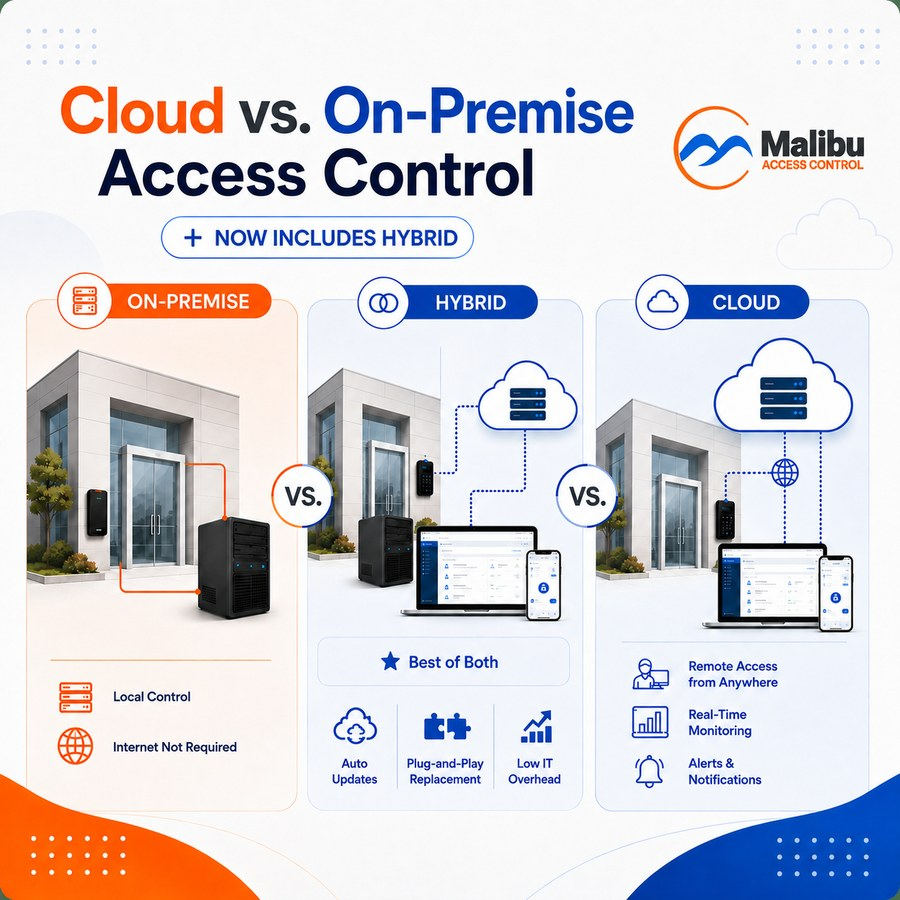
If you’ve started shopping for an access control system, you’ve probably run into these two terms pretty fast — usually before anyone explains what they mean. Dealers and product pages toss around “cloud-based” and “on-premise” like you’re supposed to already have a preference.
You don’t need to. Here’s what the terms actually mean for your building, your budget, and your day-to-day — no IT background required.
The Short Version
Every access control system needs somewhere to store the “rules” — who is allowed through which door, and when. The question is just where that storage lives and how you reach it.
On-premise means the system’s brain — the server or controller — lives inside your building. You manage it from a computer on-site, or one connected to your local network.
Cloud-based means that same brain lives on servers managed by the access control company, and you manage your doors through a website or app from anywhere. You may also see this called ACaaS — Access Control as a Service — which is the same thing under an industry acronym.
That’s the core distinction. But as you’ll see below, it isn’t actually an either/or choice. There’s a third option, hybrid, that a lot of buyer’s guides skip over.
What Changes With Cloud-Based Systems
You can manage doors from anywhere. Lock a door, add an employee, or check who badged in this morning, all from your phone — whether you’re in the building or 500 miles away.
Someone else handles the maintenance. Software updates, security patches, and backups are typically handled by the provider, not you or your Dealer.
It usually comes with an ongoing fee. Because you’re paying for hosting and maintenance on someone else’s servers, cloud systems are almost always billed as a subscription — monthly or annually, for as long as you want remote access to keep working.
You need a working internet connection. Most cloud systems can still lock and unlock doors locally if the internet drops, but remote management and live updates depend on connectivity.
What Changes With On-Premise Systems
The system lives on your property. Your building owns the hardware and the software running it — not just as a manner of speaking. The actual server sits in a closet or rack somewhere on-site.
Day-to-day operation doesn’t depend on the internet. Doors lock and unlock based on rules stored locally, so an outage at your ISP doesn’t touch how your doors behave.
Remote management is more limited by default. You can still often get remote access, but it usually depends on how your Dealer sets up the network — it’s not automatically baked in the way it is with cloud systems.
The cost structure tends to look different. On-premise systems are more often associated with a larger upfront cost and no required ongoing subscription just to keep the doors working — though this varies a lot by manufacturer, so it’s worth asking directly.
There’s Actually a Third Option: Hybrid
Cloud and on-premise are usually presented as an either/or choice, but that’s not the whole picture. Hybrid systems combine both: the doors run on local, on-site control — so day-to-day access doesn’t depend on your internet connection — while also giving you cloud-based remote management for things like adding users, checking activity, or locking down a door from your phone.
In practice, that means you aren’t forced to trade reliable local control for remote convenience. A hybrid system aims to give you both:
- Local resilience. Rules for who gets through which door live on-site, so an internet outage doesn’t affect whether your doors work correctly.
- Remote reach when you want it. You still get the phone and web-based management that makes cloud systems appealing — checking on things, granting access, reviewing activity — without that being the only place the system’s brain lives.
This is worth asking about directly when you’re comparing systems, since “cloud” and “on-premise” get marketed as if they’re the only two boxes to check, and a hybrid approach doesn’t always get mentioned unless you ask.
One Thing Hybrid Doesn’t Automatically Solve: IT Upkeep
Here’s a catch worth knowing: not every hybrid system is actually low-maintenance. Some still put a full server on-site — meaning even though you get local reliability, you can inherit the same ongoing IT overhead as a traditional on-premise setup. Patching, backups, hardware failures, and someone who knows how to fix it when it breaks.
The way around that isn’t the hybrid model itself — it’s whether the on-site hardware is built to run without a dedicated IT person watching over it. That’s a fair question to ask any Dealer showing you a hybrid system: if this fails, what happens, and who fixes it?
How Malibu Approaches Hybrid
Malibu’s system is built as a true hybrid from the ground up — not cloud with an on-site add-on, or on-premise with cloud bolted awkwardly on top. The local hardware runs your doors independently, and cloud features (remote management, mobile access, multi-site dashboards) sit on top as optional, not required.
The on-site “brains” behind it are designed to be plug-and-play rather than something that needs a server closet and an IT contract:
- Updates happen automatically, without anyone on your team needing to manage patches or versions.
- If the controller ever fails, a pre-loaded replacement ships out — you plug it in and you’re back where you left off, without rebuilding your configuration from scratch.
- Support is built in rather than something you have to separately arrange, so troubleshooting doesn’t default to “call an IT consultant.”
The practical effect is that you get the local reliability of on-premise — doors still work if the internet is down — and the reach of cloud, without taking on the maintenance burden that traditionally came with keeping a server running on-site. That holds even at remote park buildings with no reliable internet, where a cellular modem provides the connection — here’s how cities handle those.
What Doesn’t Actually Change
A few things get lumped into this debate that don’t really belong there:
- Security isn’t automatically “better” on one side. A poorly configured system of either type can be a weak link. A well-configured system of either type can be very secure.
- Both can support the same credentials. Cards, fobs, keypads, and mobile credentials aren’t exclusive to cloud or on-premise — that depends on the specific product line, not the hosting model.
- “Cloud” doesn’t mean “no local hardware.” You still need readers, controllers, and wiring at every door either way. Cloud changes where the management software lives, not whether you need physical equipment.
So Which One Is Right for You?
It depends less on your building size and more on how you want to interact with the system day-to-day:
- If you manage multiple locations, travel often, or want to grant and revoke access without being on-site — and you don’t want that convenience coming at the cost of local reliability or a growing IT to-do list — a hybrid system built for low maintenance is worth asking about specifically.
- If remote management isn’t a priority and you’d rather keep everything self-contained on-site, a purely on-premise setup is worth a closer look.
- If you’re not sure yet, that’s a completely normal place to start — and it’s exactly the kind of question worth putting directly to a Dealer, since the right answer depends on specifics (how many doors, how many buildings, how your team actually works) that are hard to generalize.
That’s also a good moment to bring in the six questions worth asking any access control Dealer. Several of them — like what happens if you stop paying, and what the 5-year cost looks like — map directly onto the cloud vs. on-premise decision.
And if you’re newer to access control altogether, our basics guide is a good place to start before diving into this comparison.
A Quick Gut Check Before You Talk to a Dealer
Whichever direction you’re leaning, it’s worth reading our guide on ownership and licensing first. Some systems marketed as “you own the hardware” still require an ongoing license for the system to keep functioning day-to-day — which blurs the line between the two models more than the marketing usually lets on.
And if this decision is part of replacing a system you already have, upgrading from an old key fob system covers what a retrofit actually changes — in most cases the controller, not your readers, locks, or wiring.
Have Questions About Your Building?
A certified Malibu Dealer can walk you through your options and give you straight answers on what fits your building. Find a Dealer near you.