If you’ve ever handed out a spare key and then spent months wondering who still has a copy, you already understand the core problem access control solves.
Access control is simply a system that decides who can get through a door, and when — without relying on physical keys. If you’re researching it for the first time, here’s a plain-language rundown of the basics: what it actually does, the main pieces involved, and the decisions you’ll need to make before choosing a system.
What Access Control Actually Does
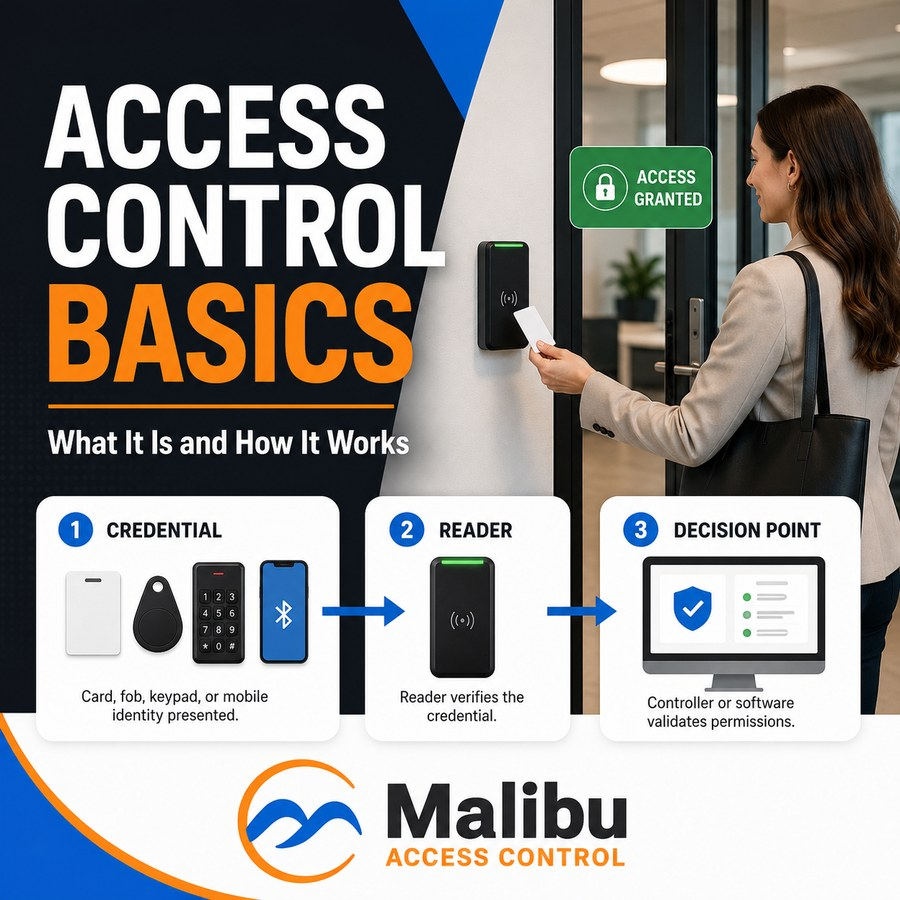
At its core, access control replaces a lock-and-key with three things:
- A credential — something a person uses to identify themselves. This could be a keycard, a fob, a code entered on a keypad, or a mobile phone.
- A reader — the device mounted at the door that reads the credential.
- A decision point — the part of the system that checks “is this person allowed through this door, right now?” and either unlocks it or doesn’t.
The advantage over a traditional key is simple: a key can’t be reprogrammed. If an employee loses one, you’re stuck rekeying locks. With access control, you deactivate that one credential in software — the door hardware doesn’t change at all.
The Three Things Access Control Lets You Do That Keys Can’t
Control by schedule. A credential can be set to work only during business hours, only on weekdays, or only during a specific date range — useful for contractors, cleaning crews, or seasonal staff.
Control by door. One credential doesn’t have to open every door. A visitor badge might open the lobby but nothing else. A manager’s credential might open every door in the building.
See a record of who came and went. Every time a credential is used, the system can log it — which door, which person, what time. If something goes wrong, you have a record to look at instead of a guess.
Common Types of Credentials
You don’t need to memorize technical standards to have this conversation with a Dealer, but it helps to know the categories:
- Cards or fobs — the most common option, tap-and-go, easy to issue and deactivate.
- Keypad codes — no physical item to carry, but codes can be shared or overheard, so they work best combined with another method.
- Mobile credentials — using a smartphone as the credential. Convenient for end users; confirm with your Dealer whether this requires an ongoing license, since that varies by manufacturer.
- Biometrics (fingerprint, facial recognition) — highest security, typically reserved for sensitive areas rather than every door in a building.
Most businesses end up using a mix — cards for general staff, something stronger for a server room or cash office, for example.
Cloud, On-Premise, or Hybrid: The Big Decision
This is the one technical-sounding decision that actually matters to you as a business owner, so it’s worth understanding at a high level:
- On-premise systems keep everything — the software, the database of who’s allowed where — on a server physically located in your building. You (or your IT team) maintain it.
- Cloud-based systems host that same information offsite, and you manage the system through a web browser or app from anywhere. Easier day-to-day, but usually means an ongoing subscription.
- Hybrid systems give you cloud convenience for management, while the doors themselves keep working locally even if the internet or cloud service goes down.
None of these is universally “best” — it depends on whether you have IT staff on-site, how many locations you’re managing, and how comfortable you are with an ongoing subscription (see our earlier post on ownership and licensing if that’s a concern for you).
What to Expect From the Buying Process
Access control isn’t something you buy directly from a manufacturer — it’s installed and supported by a local Dealer who will:
- Walk your building and recommend which doors actually need controlled access (not every door needs it)
- Recommend credential types based on your security needs and budget
- Handle installation and wiring
- Set up the software, users, and schedules
- Provide ongoing support if something needs adjusting later
Because the Dealer relationship matters as much as the equipment, it’s worth taking time to choose one you trust — we cover what questions to ask in a separate post.
Next Step
Now that you know the basics, the best next step is talking to someone who can look at your specific building and needs. Connect with a Malibu Dealer near you to get a straightforward assessment — no pressure, just answers.